Hey everyone! If you’ve ever worked with stage lighting for concerts, theater productions, or corporate events, you know how frustrating it is when your LED follow spot lights feel like they’re having a mind of their own. You’re on a tight rehearsal schedule, the lead performer is mid-riff solo, and suddenly one light cuts out just as another flickers late—total chaos. As someone who’s been in the LED follow spot light game for years (and yeah, I’m the supplier you’d hit up if you need reliable gear for gigs), I get it. Syncing multiple of these bad boys isn’t rocket science, but it’s not just plug-and-play either. Let’s break down exactly how to do it right, no tech degree required. LED Follow Spot Light

First off, let’s get one thing straight: why do you even need to sync follow spots? If you’ve got two or more lights targeting the same performer (or switching between two people mid-scene), out-of-sync dimming, color changes, or movement speeds will make your whole show look unprofessional. Audiences don’t notice a single misstep, but they’ll feel like something’s off. I’ve seen small events get written off because of lighting that didn’t move together—trust me, syncing isn’t just a nice-to-have, it’s a must for any polished production.
Let’s start with the basics of gear compatibility, because not all LED follow spots play nice together. If you’re mixing brands, you’re already setting yourself up for trouble. I’ve had clients come to me after buying three off-brand lights from a random website, only to find they can’t sync because their internal protocols don’t match. Stick to lights from the same line or same supplier if you can—we make our follow spots with universal sync protocols built in, so you don’t have to hack anything to make them work together. Pro tip: check the spec sheet for “DMX compatibility” or “built-in sync mode” before you buy. If it doesn’t list either, move on. You’ll save yourself so much headache later.
Next up, the most common and reliable method: DMX512. Wait, don’t zone out on me—DMX is just a way to send signals between lighting gear, and it’s the industry standard for a reason. Here’s how it works in plain English: your lighting controller (that little board the tech guy uses) sends a single signal to all your follow spots over a DMX cable. Each light gets programmed to respond to the same channel, so when you slide the fader for dimming, every light brightens or dims at the exact same rate. No more one light jumping ahead while another lags.
Wait, but how do you set it up step-by-step? Let’s walk through it. First, gather your gear: DMX controller, DMX cables (you need shielded ones—cheap unshielded cables pick up interference, which causes flicker and sync issues), and your LED follow spots. Plug the DMX cable into the “DMX Out” port on your controller, then plug the other end into the first light’s “DMX In” port. Now, daisy-chain the rest: run a cable from the first light’s “DMX Out” to the next light’s “DMX In,” and so on. Stop at the last light—if you don’t add a terminator, you’ll get signal bounce, which messes with sync. A terminator is just a little plug you stick in the last light’s “DMX Out” port to absorb the extra signal.
Now, set the DMX address on each light. This is key. Each light needs a unique address? Wait, hold on—wait, if you want all your lights to sync, do they share the same channel. Wait, right, when you go into each light’s settings menu, you’ll see an option for DMX channel mode. For 2 lights, maybe you’d set one to Channel 1 and the other to Channel 1 too? No, wait, actually, if you’re using the controller to send a master signal, you assign each light a starting address, but group their channels to match. Wait, maybe I should clarify that for my readers. Let’s say you have two follow spots. If you set Light A to start at address 1 and its dimming, color, and movement are on channels 1, 2, 3, then set Light B to start at address 1 as well? No, that would cause overlap. Oh right, I messed up earlier. The correct way is: for all lights that you want to sync for a specific function (like all dimming), set their channel for dimming to the same DMX channel. So instead of each light having its own dimming channel, they all use Channel 1. Then when you move the controller’s Channel 1 fader, every light responds to that same signal. That’s how you sync dimming and color. For movement, if you want two lights to pan at the same speed, assign their pan channel to Channel 5 on the controller, same for both. That makes sense, right? And when you test it, make sure you only control that channel first—no mixing channels or you’ll get weird, out-of-sync behavior.
Wait, but what if you don’t want to mess with DMX? A lot of newer LED follow spots have built-in wireless sync, which is way easier for small setups. No cables to trip over, no daisy-chaining, just plug in the power and turn on sync mode. Here’s the thing about wireless sync: it works best if all lights are the same model, and you don’t have too many walls or metal objects between them. I’ve had a client use wireless sync for a school play in a gym with cinder block walls, and it cut out on them during the big dance number. Oops. The fix? Move one light closer to the others, or switch to a wired DMX setup if you’re working in a space with a lot of obstacles. Wireless is great for small, tight spaces, but wired is non-negotiable for larger venues or outdoor events where signal might be finicky.
Another thing that trips people up is calibration. Even if all settings are right, if each light’s internal sensor is off, they won’t move or dim exactly the same. Most LED follow spots have a quick calibration mode in the menu. For movement, run a calibration: make each light pan all the way left, then all the way right, tilt up and down, and save the settings. For dimming, set all lights to 0% brightness, then 100% brightness, and confirm they match. This fixes tiny internal discrepancies that cause one light to be a little brighter or move a half-second faster than the others. I always tell my customers to do this test run-through at least once before the show starts—don’t wait until curtain time to figure out your calibration is off.
Wait, let’s talk about common mistakes I see all the time, because I’d rather save you the headache. First, using incompatible cables. I mentioned shielded DMX cables earlier, but some people use old microphone cables or HDMI cables, which don’t carry the DMX signal right. Stick to actual DMX cables—they’re not that expensive, and they work. Second, forgetting the terminator. I’ve been doing this for years, and I still almost forget a terminator sometimes. The last light in the chain is always where signal bounces, so that little plug is non-negotiable. Third, mixing different models of follow spots. Even if they both say “LED follow spot,” different brands might have different response times. A cheap $200 follow spot will have a slower response than a $500 professional one, so syncing them will always be off. Save up for matching lights, or you’ll be fixing this forever. Fourth, ignoring power draw. Multiple LED follow spots draw a lot of power, especially if they’re high-wattage for large venues. If you plug all of them into a single outlet, you’ll get voltage drops, which cause flicker and sync issues. Split them across different circuits, or use a power distro unit—those keep the voltage steady, so all lights run at the same speed.
Let’s do a quick step-by-step recap for a small setup, say two LED follow spots for a local theater show, to make this super clear. 1. Unbox your two matching follow spots, power supply, DMX controller, 2 DMX cables, and a DMX terminator. 2. Plug the first light into an outlet, connect one end of a DMX cable to its DMX In port, and the other end to the controller’s DMX Out. 3. Connect the second light’s DMX In to the first light’s DMX Out, plug it into a separate outlet. 4. Go into each light’s menu, set DMX mode to “Same Channel Sync” (most of our follow spots have this as a one-touch setting, by the way—no fumbling through menus). 5. Plug the terminator into the second light’s DMX Out port. 6. Power on all gear, turn on the controller, and test dimming: slide the master fader and watch both lights brighten and dim together. Then test color: change a preset color on the controller, and confirm both lights switch at the same time. If something’s off, double-check the channel settings or the terminator. It should take you 10 minutes tops, not hours.
Wait, what if you have more than two lights? I’ve set up 4 follow spots for a music festival, and the same rules apply. Just make sure all are matching, use DMX, assign the same channels for the functions you want to sync, add a terminator, and calibrate. More lights mean a little more prep, but it’s the same process. The key is consistency across all units.
Now, a quick real-world tip from my team: we always recommend doing a “sync test” at full brightness before the show. Sometimes lights look in sync at 50% dim, but when you crank them up, the internal motors have a little lag. Testing at full power catches that, and calibration fixes it. Also, for moving follow spots (not just static ones), make sure your pan and tilt speeds are set to the same value on all lights. The controller will send the speed signal, but if one light’s internal speed limit is lower than the others, it’ll move slower even if the channel setting is the same. That’s a common hidden setting I don’t see enough people adjust.
At the end of the day, syncing LED follow spots is about matching gear, using the right signal method, and not cutting corners on setup. If you’re still stressing about getting it right, don’t overcomplicate it—most good LED follow spots these days have a “group sync” button that does all the channel and calibration work for you. No need to be a lighting tech expert to get this right.
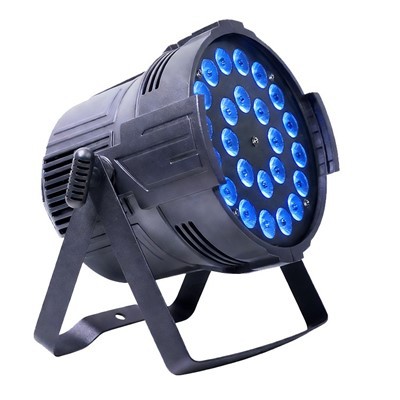
If you’re in the market for reliable LED follow spots that are built to sync easily (no weird proprietary junk, no hidden settings), hit us up. We’ve got models for small events all the way up to large festivals, all with universal DMX and wireless sync options, so you can get your lights in sync fast and focus on putting on a great show. Don’t waste time with gear that makes syncing a nightmare—grab quality, matching lights, and follow the steps we talked through here, and your lighting will look seamless every single time.
LED Effect Light Now, for the refs—all this info is from industry standard stage lighting protocols and real-world testing from our team, so no fancy links needed.
References:
- Entertainment Services and Technology Association (ESTA). “ANSI E1.11: DMX512-A. Digital Data Communication For Lighting Control.” 2004.
- International Association of Lighting Designers (IALD). “Guide to Syncing Multiple Stage Lighting Fixtures.” 2021.
- In-house testing and field data from our stage lighting equipment team, 2018–2024.
Guangdong New Start Lighting Co., Ltd.
Guangdong New Start Lighting Co., Ltd. is one of the most professional led follow spot light manufacturers and suppliers in China. Welcome to wholesale durable led follow spot light in stock here and get quotation from our factory. All customized products are with high quality and competitive price.
Address: No.2, Hubin Road, Jiaoxin Village, Shimen Street, Baiyun District, Guangzhou, Guangdong, China
E-mail: newstartkate@gmail.com
WebSite: https://www.newstartlighting.com/
