Hey there, if you’ve installed dimmable cabinet lights before or are thinking about picking some up for your kitchen, pantry, or bathroom, you’ve probably wondered this: Can I hook those lights up to a dimmer remote? Let’s cut through the confusing jargon and talk about this straight—especially since I’m the guy who sells these dimmable cabinet lights, so I hear this question all the time from customers just like you. Dimmable Cabinet Lights
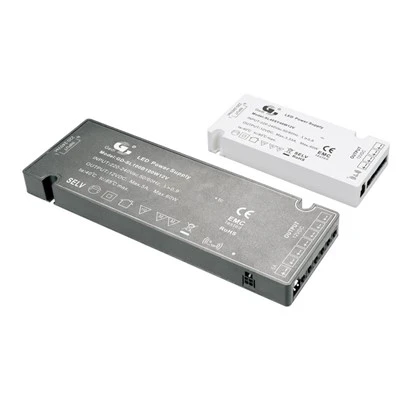
First off, let’s get the basics straight: Not all dimmable cabinet lights work with every dimmer remote. That’s a big one, and it’s the reason so many people get frustrated when they try to pair them only to get a flickering light or no dim function at all. Let’s break down the types of dimmer remotes and your cabinet lights, because that’s where the compatibility lives.
From my time as a dimmable cabinet lights supplier, most of the products I sell use either LED technology (which they all should, honestly—way more energy-efficient than old incandescent or halogen) and one of two common dimming protocols: PWM (Pulse Width Modulation) or 0-10V dimming. A handful even use simple resistive dimming, but that’s pretty rare for cabinet lights these days. Now, dimmer remotes fall into two main categories too: wired dimmers and wireless remotes (the ones people usually mean when they say “dimmer remote”). Wireless ones are either RF (Radio Frequency) or Bluetooth, mostly, since Wi-Fi is overkill for small cabinet light setups.
Let’s start with the good news first: If your dimmable cabinet lights are LED (which they should be—we stopped selling anything else for cabinet lights years ago) and your dimmer remote is RF or Bluetooth labeled for LED dimming, 9 times out of 10 they’ll work. Why? RF and Bluetooth remotes communicate directly with the driver inside your cabinet light, not just the bulb itself. Wait, hold on—let me clarify that: Some dimmable cabinet lights are single-bulb, some are strip lights (which are way more common for cabinets), so the “driver” is the small box that regulates power to the LEDs. If the remote syncs with that driver, it’ll adjust the light’s brightness smoothly. I’ve had customers come to me saying they bought a cheap dimmer remote from a big box store that didn’t work, and when they swapped for one of the remotes we carry (specifically made to pair with our dimmable cabinet lights), it clicked right in. No more flicker, no more dead brightness levels, just solid dimming.
Now, the bad part: If you grab a dimmer remote meant for incandescent lights, that’s a problem. Old-style incandescent dimmers work by cutting off part of the AC wave, which works because incandescents are resistive loads. LEDs (and even halogen, for that matter) are electronic loads—they need a driver, and incandescent dimmers don’t play nice with them. That’s why you get that annoying flicker when you pair the wrong remote. A lot of people don’t know this, so they waste money on remotes that don’t work. As a supplier, I always make sure to note on every product listing which dimming protocols our lights use, so you can match the remote. If you’re shopping from somewhere else, check the fine print: Look for “LED-compatible” on the dimmer remote, not just “dimmer.”
Wait, another thing: Some dimmable cabinet lights are “hardwired only,” meaning they don’t have a wireless receiver built in, so you can’t hook a remote up to them at all. Those are usually the cheaper, no-frills strips that just plug into a wall switch. If you want a remote, make sure your light’s specs say “wireless dimmable” or that it includes a remote receiver. A lot of customers come to me asking if they can add a remote to their existing non-wireless dimmable cabinet lights, and the short answer is—usually not. The driver doesn’t have a place to connect a receiver, so you’d have to swap out the whole light, which is more expensive than just getting the right one to start with.
Let’s talk about common mistakes I see all the time. First, buying a universal dimmer remote and assuming it’ll work. Universal remotes advertise they work with everything, but in reality, they’re only universal for certain protocols. For example, a Bluetooth remote for LED might not pair with an RF driver, and vice versa. Our dimmable cabinet lights use a specific RF protocol (2.4GHz, no Wi-Fi needed) because it’s more reliable in cabinets—you don’t have to worry about Wi-Fi signal dropping if your router’s on another floor. That’s a big plus for small spaces like pantries or under-cabinet areas where Wi-Fi might be spotty.
Second, not checking the power load. If you’re hooking up multiple dimmable cabinet lights to one remote, you have to make sure the total wattage of all the lights is within the remote’s range. Our remotes can handle up to 30 watts, which is enough for about 4 7.5W dimmable cabinet light strips—perfect for most small kitchens or bathroom vanities. If you cram more than that, the remote might not dim all of them evenly, or it could even damage the drivers over time. I’ve had a customer a few months back who tried to hook up 6 strips to one remote, and it worked for a week before it started flickering. Swapped to a 50W remote, and it’s been smooth ever since. That’s the kind of tip I give to every customer who’s setting up multiple lights—don’t skip the wattage check.
What about if you want to use a smart dimmer remote, like Alexa or Google Home-compatible ones? That works too, as long as your dimmable cabinet lights are set up for it. A lot of our dimmable cabinet lights come with a smart bridge that lets you pair them with smart remotes, so you can dim the lights from your phone, or even set schedules if you want. I actually recommend that for people who use their kitchen late at night—dimmed cabinet lights are way less harsh than bright overheads when you’re making coffee after dinner. But again, the key here is compatibility: Make sure the smart remote is compatible with the driver in your light. If you buy a random smart bulb and a smart remote, they might not pair, same with cabinet lights.
Wait, let’s address a question I get a lot: Can I use a dimmer remote for my old dimmable cabinet lights from 5 years ago? Probably not, unless they use the same dimming protocol. LED tech has come a long way, and older lights might have drivers that only work with older remotes. If your old remote broke, the easiest fix is to either get a replacement remote from whoever sold you the lights (if they still make them) or swap the whole light for a modern one that works with the remotes we carry. I’ve had customers come in with 10-year-old cabinet lights that wouldn’t pair with any new remotes, and when they upgraded, they noticed a big difference in brightness uniformity too—older LEDs were often uneven, while our new dimmable cabinet lights stay smooth from 10% to 100% brightness.
Let’s wrap this up with a quick step-by-step to make sure you don’t mess this up, because I want you to get it right the first time:
- Check your dimmable cabinet light’s specs: What dimming protocol does it use? (Look for PWM, RF, Bluetooth, or 0-10V. Our products use 2.4GHz RF for reliability.)
- Make sure your dimmer remote is labeled for LED dimming, not incandescent.
- Confirm the remote’s load wattage matches the total wattage of your lights.
- If it’s a smart remote, make sure it’s compatible with your light’s smart features.
And if you’re still not sure? That’s where I come in, as your go-to dimmable cabinet lights supplier. I don’t do hard sell—just straight answers. If you send me a message with what kind of setup you have, I’ll tell you exactly which remote works, or if you need to adjust your light setup. No confusing menus, no jargon, just someone who’s been in this game long enough to know what works.
Wait, one last thing to bust a myth: Some people think dimming LED cabinet lights will shorten their lifespan. That’s not true for modern LEDs. Dimming just lowers the power to the driver, and most good drivers (like the ones we use) are built to handle that. I’ve had customers who dim their cabinet lights 24/7 for 2 years and haven’t had a single light burn out. So that’s a non-issue, as long as you’re using a compatible remote.

At the end of the day, the short answer to “Can dimmable cabinet lights be connected to a dimmer remote?” is: Yes, as long as you match the protocol and make sure both are LED-compatible. If you’re shopping for a new setup or need to replace a remote, don’t waste time on generic products—reach out and let’s chat about what you need. No fake links, no fancy pitches, just honest advice for your cabinet lighting.
Dimmable Cabinet Lights References:
- Energy Star, “LED Lighting Dimming Best Practices,” 2022.
- Lighting Research Center, Rensselaer Polytechnic Institute, “Compatibility Issues Between LED Drivers and Dimming Controls,” 2021.
- National Electrical Manufacturers Association (NEMA), “LED Dimmer Compatibility Standards,” 2020.
- Consumer Reports, “How to Choose Dimmers for LED Lights,” 2023.
Foshan Gedi Electrnoic Co., Ltd.
As one of the most professional dimmable cabinet lights manufacturers in China, we’re featured by quality products and good price. Please rest assured to buy advanced dimmable cabinet lights for sale here from our factory. If you have any enquiry about cooperation, please feel free to email us.
Address: 4th Floor, Building 8, South District, Huayi Decoration City, No.10, Laixiang Road, Shiwan Sub-district, Chancheng District, Foshan City, Guangdong Province, China.
E-mail: market@gedi-lighting.com
WebSite: https://www.gedi-lighting.com/
